
Signature Detection and Alerting an Admin
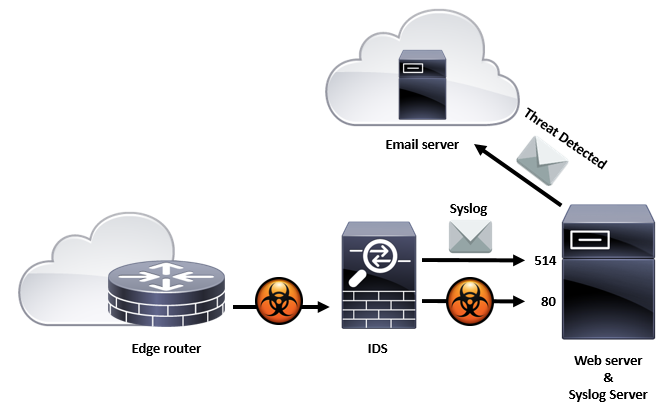
In the lab, you will learn how to create SNORT rules. SNORT rules are comprised of two sections: header and options. The rule’s header consists of a rule’s action, protocols, and ports. In this section, we will create a SNORT rule using logical header attributes inside of a test ruleset (local.rules). In this lab, you will also learn how to send an email message to alert an administrator when a significant threat is detected.
outcomes:
In this lab, you will learn to:
- Create a rule in SNORT
- Test a SNORT rule
- Send an email alert to the administrator
videos:
Before you start this lab, review these videos.
Setting Up the Virtual Environment
Defining a SNORT Rule Comprised of Only the Header Section
Defining a SNORT Rule Comprised of Both the Header and Options Sections
Overview
As stated in the IDS and Syslog lab, “Traffic flow fingerprints can be defined using layer specific header field values and or content derived from data. These fingerprints are known as signatures and can be defined through SNORT rules and stored in files called rulesets.” In this lab, we will create SNORT rules used to detect traffic flows. Because this is an IDS, it does not stop the attack from going through, but is designed to alert the presence of significant threats. We will also demonstrate how an IDS can alert a sysadmin via email when a significant threat is detected.
Signature Detection and Alerting an Admin