
Overview
Operations Use Case: Reducing Downtime Caused by an Outage
Description: You may think that you're saving your business money by putting off upgrading your equipment. By doing this, the old equipment has become unreliable and creates downtime through failing processes, freezing up, or causing lag.
Security Type: Application, Network
Threat Actors: Insiders
Threat Actors' Goals: N/A
Your Task: Using LogRhythm's Web Console Dashboards and Analyzer Grid, locate any logs that may be an indication of an operational issue or outage.
- Data to look out for might include an increase in certain Common Events and an increase in Classifications.
- Work the incident through the Threat Lifecycle Management process and document your findings as you go.
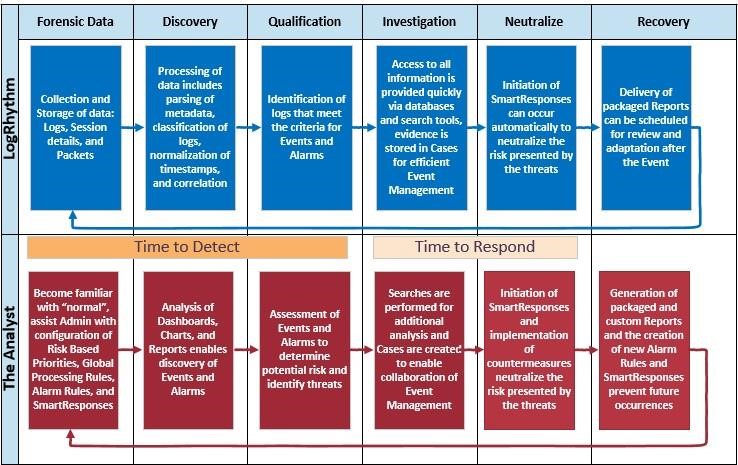
There is a generic technique for using the LogRhythm Web Console for threat hunting. You need to familiarize yourself with the log data in your environment by looking at the Web Console, dashboards, alarms, reports, and running searches. This helps you discover things that should not be occurring in your environment abnormal and usually rare. Some of the best tools in the Web Console for discovering threats are:
- The time range filter
- Alarms
- Top Classification
- Top Common Events
- Top Log Source Type widgets
Once you have discovered a threat, you need to decide whether you actually need to do something about it. This is known as qualifying the threat. Then you can investigate the threat using pivots, drilldowns, searches, reports, and cases. Next we neutralize the threat; we stop the problem from getting worse. Lastly, we recover. We determine how we will prevent this and similar types of things from happening again.